Appearance
使用Github+picGo搭建图床,保姆级教程来了
Q:图床的选择
A:推荐使用GitHub作为图床,特点是免费、稳定,有一个小缺点是国内访问速度慢,不过没关系,可以使用jsDelivr免费CDN加速。
Q:jsDelivr是什么?
A:jsDelivr是国外的一家优秀的公共 CDN 服务提供商,该平台是首个「打通中国大陆与海外的免费CDN服务」,无须担心中国防火墙问题而影响使用。官网:http://www.jsdelivr.com/
1. 注册一个Github账号
首先你需要一个github账号,如果没有的话,先注册。
github官网地址: https://github.com/
注册过程省略,因为这是保姆都不管的事情。
友情提示:可能在注册过程中会出现 “Unable to verify your captcha response… …”,一直不能正常注册。
网上有各种解决方案:换浏览器、换电脑… …
2. 配置Github
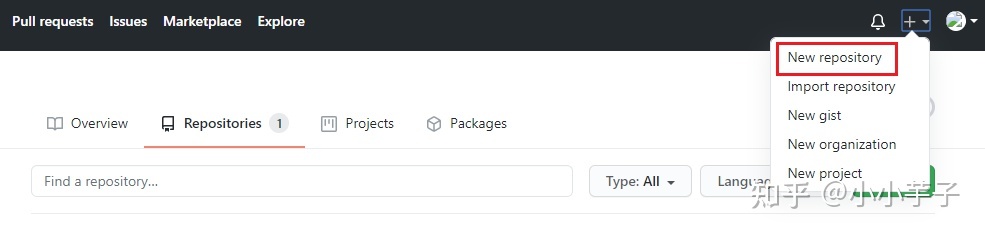
2.1 创建一个新仓库,用于存放图片。
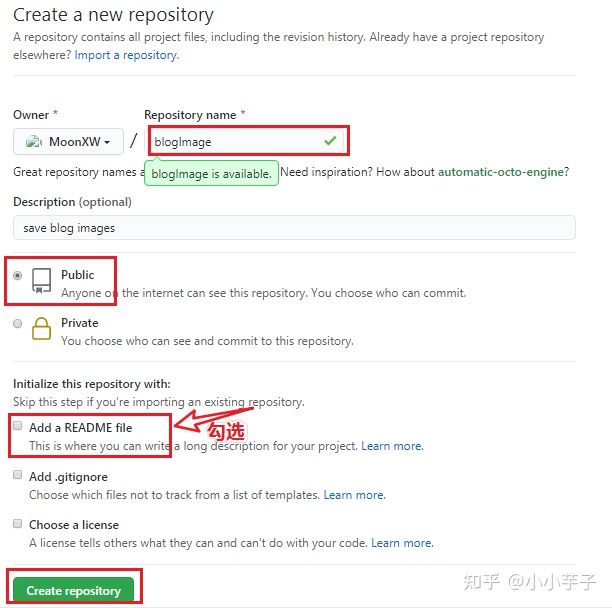
填写仓库名称和描述,且仓库必须是public的,否则存储的图片不能正常访问。
2.2 生成一个token,用于picGo访问github
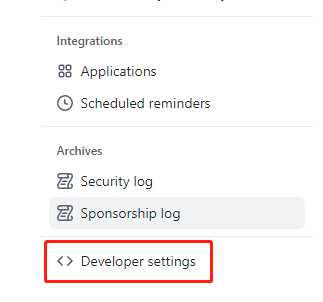
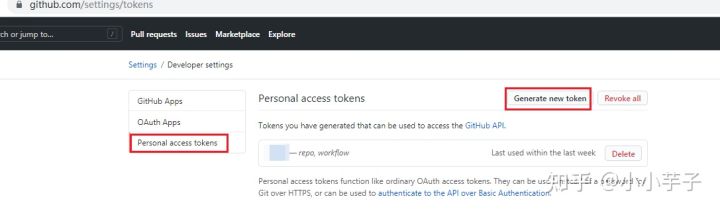
头像 个人 => settings => developer settings =>
选择左侧菜单的Developer settings
之后选择左侧Personal access tokens,再点击Generate new token(目前最多一年时间过期)
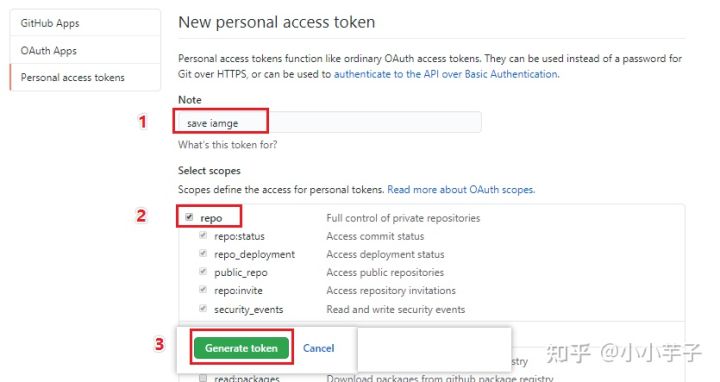
填写Note,勾选repo.
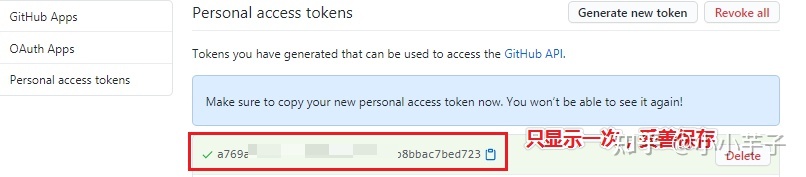
注意,生成的token只会在这里显示一次,所以记得单独保存下来哦。
至此,Github的配置完成。
Permissions
ps: token需要配置,才能上传


Actions
Workflows, workflow runs and artifacts.
<details id="details-8e193f" data-view-component="true" class="details-reset details-overlay d-inline-block position-relative" style="box-sizing: border-box; display: inline-block !important; position: relative !important;"><summary role="button" class="btn btn-sm select-menu-button" aria-haspopup="menu" style="box-sizing: border-box; display: inline-block; cursor: pointer; position: relative; padding: 3px 12px; font-size: 12px; font-weight: var(--base-text-weight-medium, 500); line-height: 20px; white-space: nowrap; vertical-align: middle; user-select: none; border-width: 1px; border-style: solid; border-color: var(--button-default-borderColor-rest, var(--color-btn-border)); border-image: initial; border-radius: 6px; appearance: none; color: var(--button-default-fgColor-rest, var(--color-btn-text)); background-color: var(--button-default-bgColor-rest, var(--color-btn-bg)); box-shadow: var(--button-default-shadow-resting, var(--color-btn-shadow)),var(--button-default-shadow-inset, var(--color-btn-inset-shadow)); transition: color 80ms cubic-bezier(0.33, 1, 0.68, 1) 0s, background-color, box-shadow, border-color; list-style: none;"><span class="text-normal" style="box-sizing: border-box; font-weight: var(--base-text-weight-normal, 400) !important;">Access:<span> </span></span><span data-menu-button="" class="css-truncate css-truncate-target" style="box-sizing: border-box; overflow: hidden; text-overflow: ellipsis; white-space: nowrap; display: inline-block; max-width: 125px; vertical-align: top;">Read and write</span><span> </span></summary></details>
Administration
Repository creation, deletion, settings, teams, and collaborators.
<details id="details-0d5d5a" data-view-component="true" class="details-reset details-overlay d-inline-block position-relative" style="box-sizing: border-box; display: inline-block !important; position: relative !important;"><summary role="button" class="btn btn-sm select-menu-button" aria-haspopup="menu" style="box-sizing: border-box; display: inline-block; cursor: pointer; position: relative; padding: 3px 12px; font-size: 12px; font-weight: var(--base-text-weight-medium, 500); line-height: 20px; white-space: nowrap; vertical-align: middle; user-select: none; border-width: 1px; border-style: solid; border-color: var(--button-default-borderColor-rest, var(--color-btn-border)); border-image: initial; border-radius: 6px; appearance: none; color: var(--button-default-fgColor-rest, var(--color-btn-text)); background-color: var(--button-default-bgColor-rest, var(--color-btn-bg)); box-shadow: var(--button-default-shadow-resting, var(--color-btn-shadow)),var(--button-default-shadow-inset, var(--color-btn-inset-shadow)); transition: color 80ms cubic-bezier(0.33, 1, 0.68, 1) 0s, background-color, box-shadow, border-color; list-style: none;"><span class="text-normal" style="box-sizing: border-box; font-weight: var(--base-text-weight-normal, 400) !important;">Access:<span> </span></span><span data-menu-button="" class="css-truncate css-truncate-target" style="box-sizing: border-box; overflow: hidden; text-overflow: ellipsis; white-space: nowrap; display: inline-block; max-width: 125px; vertical-align: top;">Read and write</span><span> </span></summary></details>
Attestations
Create and retrieve attestations for a repository.
<details id="details-e4daf5" data-view-component="true" class="details-reset details-overlay d-inline-block position-relative" style="box-sizing: border-box; display: inline-block !important; position: relative !important;"><summary role="button" class="btn btn-sm select-menu-button" aria-haspopup="menu" style="box-sizing: border-box; display: inline-block; cursor: pointer; position: relative; padding: 3px 12px; font-size: 12px; font-weight: var(--base-text-weight-medium, 500); line-height: 20px; white-space: nowrap; vertical-align: middle; user-select: none; border-width: 1px; border-style: solid; border-color: var(--button-default-borderColor-rest, var(--color-btn-border)); border-image: initial; border-radius: 6px; appearance: none; color: var(--button-default-fgColor-rest, var(--color-btn-text)); background-color: var(--button-default-bgColor-rest, var(--color-btn-bg)); box-shadow: var(--button-default-shadow-resting, var(--color-btn-shadow)),var(--button-default-shadow-inset, var(--color-btn-inset-shadow)); transition: color 80ms cubic-bezier(0.33, 1, 0.68, 1) 0s, background-color, box-shadow, border-color; list-style: none;"><span class="text-normal" style="box-sizing: border-box; font-weight: var(--base-text-weight-normal, 400) !important;">Access:<span> </span></span><span data-menu-button="" class="css-truncate css-truncate-target" style="box-sizing: border-box; overflow: hidden; text-overflow: ellipsis; white-space: nowrap; display: inline-block; max-width: 125px; vertical-align: top;">Read and write</span><span> </span></summary></details>
Code scanning alerts
View and manage code scanning alerts.
<details id="details-b04b13" data-view-component="true" class="details-reset details-overlay d-inline-block position-relative" style="box-sizing: border-box; display: inline-block !important; position: relative !important;"><summary role="button" class="btn btn-sm select-menu-button" aria-haspopup="menu" style="box-sizing: border-box; display: inline-block; cursor: pointer; position: relative; padding: 3px 12px; font-size: 12px; font-weight: var(--base-text-weight-medium, 500); line-height: 20px; white-space: nowrap; vertical-align: middle; user-select: none; border-width: 1px; border-style: solid; border-color: var(--button-default-borderColor-rest, var(--color-btn-border)); border-image: initial; border-radius: 6px; appearance: none; color: var(--button-default-fgColor-rest, var(--color-btn-text)); background-color: var(--button-default-bgColor-rest, var(--color-btn-bg)); box-shadow: var(--button-default-shadow-resting, var(--color-btn-shadow)),var(--button-default-shadow-inset, var(--color-btn-inset-shadow)); transition: color 80ms cubic-bezier(0.33, 1, 0.68, 1) 0s, background-color, box-shadow, border-color; list-style: none;"><span class="text-normal" style="box-sizing: border-box; font-weight: var(--base-text-weight-normal, 400) !important;">Access:<span> </span></span><span data-menu-button="" class="css-truncate css-truncate-target" style="box-sizing: border-box; overflow: hidden; text-overflow: ellipsis; white-space: nowrap; display: inline-block; max-width: 125px; vertical-align: top;">Read and write</span><span> </span></summary></details>
Codespaces
Create, edit, delete and list Codespaces.
<details id="details-306794" data-view-component="true" class="details-reset details-overlay d-inline-block position-relative" style="box-sizing: border-box; display: inline-block !important; position: relative !important;"><summary role="button" class="btn btn-sm select-menu-button" aria-haspopup="menu" style="box-sizing: border-box; display: inline-block; cursor: pointer; position: relative; padding: 3px 12px; font-size: 12px; font-weight: var(--base-text-weight-medium, 500); line-height: 20px; white-space: nowrap; vertical-align: middle; user-select: none; border-width: 1px; border-style: solid; border-color: var(--button-default-borderColor-rest, var(--color-btn-border)); border-image: initial; border-radius: 6px; appearance: none; color: var(--button-default-fgColor-rest, var(--color-btn-text)); background-color: var(--button-default-bgColor-rest, var(--color-btn-bg)); box-shadow: var(--button-default-shadow-resting, var(--color-btn-shadow)),var(--button-default-shadow-inset, var(--color-btn-inset-shadow)); transition: color 80ms cubic-bezier(0.33, 1, 0.68, 1) 0s, background-color, box-shadow, border-color; list-style: none;"><span class="text-normal" style="box-sizing: border-box; font-weight: var(--base-text-weight-normal, 400) !important;">Access:<span> </span></span><span data-menu-button="" class="css-truncate css-truncate-target" style="box-sizing: border-box; overflow: hidden; text-overflow: ellipsis; white-space: nowrap; display: inline-block; max-width: 125px; vertical-align: top;">Read and write</span><span> </span></summary></details>
Codespaces lifecycle admin
Manage the lifecycle of Codespaces, including starting and stopping.
<details id="details-f3f0c7" data-view-component="true" class="details-reset details-overlay d-inline-block position-relative" style="box-sizing: border-box; display: inline-block !important; position: relative !important;"><summary role="button" class="btn btn-sm select-menu-button" aria-haspopup="menu" style="box-sizing: border-box; display: inline-block; cursor: pointer; position: relative; padding: 3px 12px; font-size: 12px; font-weight: var(--base-text-weight-medium, 500); line-height: 20px; white-space: nowrap; vertical-align: middle; user-select: none; border-width: 1px; border-style: solid; border-color: var(--button-default-borderColor-rest, var(--color-btn-border)); border-image: initial; border-radius: 6px; appearance: none; color: var(--button-default-fgColor-rest, var(--color-btn-text)); background-color: var(--button-default-bgColor-rest, var(--color-btn-bg)); box-shadow: var(--button-default-shadow-resting, var(--color-btn-shadow)),var(--button-default-shadow-inset, var(--color-btn-inset-shadow)); transition: color 80ms cubic-bezier(0.33, 1, 0.68, 1) 0s, background-color, box-shadow, border-color; list-style: none;"><span class="text-normal" style="box-sizing: border-box; font-weight: var(--base-text-weight-normal, 400) !important;">Access:<span> </span></span><span data-menu-button="" class="css-truncate css-truncate-target" style="box-sizing: border-box; overflow: hidden; text-overflow: ellipsis; white-space: nowrap; display: inline-block; max-width: 125px; vertical-align: top;">Read and write</span><span> </span></summary></details>
Codespaces metadata
Access Codespaces metadata including the devcontainers and machine type.
<details id="details-107c00" data-view-component="true" class="details-reset details-overlay d-inline-block position-relative" style="box-sizing: border-box; display: inline-block !important; position: relative !important;"><summary role="button" class="btn btn-sm select-menu-button" aria-haspopup="menu" style="box-sizing: border-box; display: inline-block; cursor: pointer; position: relative; padding: 3px 12px; font-size: 12px; font-weight: var(--base-text-weight-medium, 500); line-height: 20px; white-space: nowrap; vertical-align: middle; user-select: none; border-width: 1px; border-style: solid; border-color: var(--button-default-borderColor-rest, var(--color-btn-border)); border-image: initial; border-radius: 6px; appearance: none; color: var(--button-default-fgColor-rest, var(--color-btn-text)); background-color: var(--button-default-bgColor-rest, var(--color-btn-bg)); box-shadow: var(--button-default-shadow-resting, var(--color-btn-shadow)),var(--button-default-shadow-inset, var(--color-btn-inset-shadow)); transition: color 80ms cubic-bezier(0.33, 1, 0.68, 1) 0s, background-color, box-shadow, border-color; list-style: none;"><span class="text-normal" style="box-sizing: border-box; font-weight: var(--base-text-weight-normal, 400) !important;">Access:<span> </span></span><span data-menu-button="" class="css-truncate css-truncate-target" style="box-sizing: border-box; overflow: hidden; text-overflow: ellipsis; white-space: nowrap; display: inline-block; max-width: 125px; vertical-align: top;">Read-only</span><span> </span></summary></details>
Codespaces secrets
Restrict Codespaces user secrets modifications to specific repositories.
<details id="details-0c778e" data-view-component="true" class="details-reset details-overlay d-inline-block position-relative" style="box-sizing: border-box; display: inline-block !important; position: relative !important;"><summary role="button" class="btn btn-sm select-menu-button" aria-haspopup="menu" style="box-sizing: border-box; display: inline-block; cursor: pointer; position: relative; padding: 3px 12px; font-size: 12px; font-weight: var(--base-text-weight-medium, 500); line-height: 20px; white-space: nowrap; vertical-align: middle; user-select: none; border-width: 1px; border-style: solid; border-color: var(--button-default-borderColor-rest, var(--color-btn-border)); border-image: initial; border-radius: 6px; appearance: none; color: var(--button-default-fgColor-rest, var(--color-btn-text)); background-color: var(--button-default-bgColor-rest, var(--color-btn-bg)); box-shadow: var(--button-default-shadow-resting, var(--color-btn-shadow)),var(--button-default-shadow-inset, var(--color-btn-inset-shadow)); transition: color 80ms cubic-bezier(0.33, 1, 0.68, 1) 0s, background-color, box-shadow, border-color; list-style: none;"><span class="text-normal" style="box-sizing: border-box; font-weight: var(--base-text-weight-normal, 400) !important;">Access:<span> </span></span><span data-menu-button="" class="css-truncate css-truncate-target" style="box-sizing: border-box; overflow: hidden; text-overflow: ellipsis; white-space: nowrap; display: inline-block; max-width: 125px; vertical-align: top;">Read and write</span><span> </span></summary></details>
Commit statuses
Commit statuses.
<details id="details-e301a6" data-view-component="true" class="details-reset details-overlay d-inline-block position-relative" style="box-sizing: border-box; display: inline-block !important; position: relative !important;"><summary role="button" class="btn btn-sm select-menu-button" aria-haspopup="menu" style="box-sizing: border-box; display: inline-block; cursor: pointer; position: relative; padding: 3px 12px; font-size: 12px; font-weight: var(--base-text-weight-medium, 500); line-height: 20px; white-space: nowrap; vertical-align: middle; user-select: none; border-width: 1px; border-style: solid; border-color: var(--button-default-borderColor-rest, var(--color-btn-border)); border-image: initial; border-radius: 6px; appearance: none; color: var(--button-default-fgColor-rest, var(--color-btn-text)); background-color: var(--button-default-bgColor-rest, var(--color-btn-bg)); box-shadow: var(--button-default-shadow-resting, var(--color-btn-shadow)),var(--button-default-shadow-inset, var(--color-btn-inset-shadow)); transition: color 80ms cubic-bezier(0.33, 1, 0.68, 1) 0s, background-color, box-shadow, border-color; list-style: none;"><span class="text-normal" style="box-sizing: border-box; font-weight: var(--base-text-weight-normal, 400) !important;">Access:<span> </span></span><span data-menu-button="" class="css-truncate css-truncate-target" style="box-sizing: border-box; overflow: hidden; text-overflow: ellipsis; white-space: nowrap; display: inline-block; max-width: 125px; vertical-align: top;">Read and write</span><span> </span></summary></details>
Contents
Repository contents, commits, branches, downloads, releases, and merges.
<details id="details-0a5339" data-view-component="true" class="details-reset details-overlay d-inline-block position-relative" style="box-sizing: border-box; display: inline-block !important; position: relative !important;"><summary role="button" class="btn btn-sm select-menu-button" aria-haspopup="menu" style="box-sizing: border-box; display: inline-block; cursor: pointer; position: relative; padding: 3px 12px; font-size: 12px; font-weight: var(--base-text-weight-medium, 500); line-height: 20px; white-space: nowrap; vertical-align: middle; user-select: none; border-width: 1px; border-style: solid; border-color: var(--button-default-borderColor-rest, var(--color-btn-border)); border-image: initial; border-radius: 6px; appearance: none; color: var(--button-default-fgColor-rest, var(--color-btn-text)); background-color: var(--button-default-bgColor-rest, var(--color-btn-bg)); box-shadow: var(--button-default-shadow-resting, var(--color-btn-shadow)),var(--button-default-shadow-inset, var(--color-btn-inset-shadow)); transition: color 80ms cubic-bezier(0.33, 1, 0.68, 1) 0s, background-color, box-shadow, border-color; list-style: none;"><span class="text-normal" style="box-sizing: border-box; font-weight: var(--base-text-weight-normal, 400) !important;">Access:<span> </span></span><span data-menu-button="" class="css-truncate css-truncate-target" style="box-sizing: border-box; overflow: hidden; text-overflow: ellipsis; white-space: nowrap; display: inline-block; max-width: 125px; vertical-align: top;">Read and write</span><span> </span></summary></details>
Custom properties
View and set values for a repository's custom properties, when allowed by the property.
<details id="details-53990e" data-view-component="true" class="details-reset details-overlay d-inline-block position-relative" style="box-sizing: border-box; display: inline-block !important; position: relative !important;"><summary role="button" class="btn btn-sm select-menu-button" aria-haspopup="menu" style="box-sizing: border-box; display: inline-block; cursor: pointer; position: relative; padding: 3px 12px; font-size: 12px; font-weight: var(--base-text-weight-medium, 500); line-height: 20px; white-space: nowrap; vertical-align: middle; user-select: none; border-width: 1px; border-style: solid; border-color: var(--button-default-borderColor-rest, var(--color-btn-border)); border-image: initial; border-radius: 6px; appearance: none; color: var(--button-default-fgColor-rest, var(--color-btn-text)); background-color: var(--button-default-bgColor-rest, var(--color-btn-bg)); box-shadow: var(--button-default-shadow-resting, var(--color-btn-shadow)),var(--button-default-shadow-inset, var(--color-btn-inset-shadow)); transition: color 80ms cubic-bezier(0.33, 1, 0.68, 1) 0s, background-color, box-shadow, border-color; list-style: none;"><span class="text-normal" style="box-sizing: border-box; font-weight: var(--base-text-weight-normal, 400) !important;">Access:<span> </span></span><span data-menu-button="" class="css-truncate css-truncate-target" style="box-sizing: border-box; overflow: hidden; text-overflow: ellipsis; white-space: nowrap; display: inline-block; max-width: 125px; vertical-align: top;">Read and write</span><span> </span></summary></details>
Dependabot alerts
Retrieve Dependabot alerts.
<details id="details-d3c9e9" data-view-component="true" class="details-reset details-overlay d-inline-block position-relative" style="box-sizing: border-box; display: inline-block !important; position: relative !important;"><summary role="button" class="btn btn-sm select-menu-button" aria-haspopup="menu" style="box-sizing: border-box; display: inline-block; cursor: pointer; position: relative; padding: 3px 12px; font-size: 12px; font-weight: var(--base-text-weight-medium, 500); line-height: 20px; white-space: nowrap; vertical-align: middle; user-select: none; border-width: 1px; border-style: solid; border-color: var(--button-default-borderColor-rest, var(--color-btn-border)); border-image: initial; border-radius: 6px; appearance: none; color: var(--button-default-fgColor-rest, var(--color-btn-text)); background-color: var(--button-default-bgColor-rest, var(--color-btn-bg)); box-shadow: var(--button-default-shadow-resting, var(--color-btn-shadow)),var(--button-default-shadow-inset, var(--color-btn-inset-shadow)); transition: color 80ms cubic-bezier(0.33, 1, 0.68, 1) 0s, background-color, box-shadow, border-color; list-style: none;"><span class="text-normal" style="box-sizing: border-box; font-weight: var(--base-text-weight-normal, 400) !important;">Access:<span> </span></span><span data-menu-button="" class="css-truncate css-truncate-target" style="box-sizing: border-box; overflow: hidden; text-overflow: ellipsis; white-space: nowrap; display: inline-block; max-width: 125px; vertical-align: top;">Read and write</span><span> </span></summary></details>
Dependabot secrets
Manage Dependabot repository secrets.
<details id="details-d5691b" data-view-component="true" class="details-reset details-overlay d-inline-block position-relative" style="box-sizing: border-box; display: inline-block !important; position: relative !important;"><summary role="button" class="btn btn-sm select-menu-button" aria-haspopup="menu" style="box-sizing: border-box; display: inline-block; cursor: pointer; position: relative; padding: 3px 12px; font-size: 12px; font-weight: var(--base-text-weight-medium, 500); line-height: 20px; white-space: nowrap; vertical-align: middle; user-select: none; border-width: 1px; border-style: solid; border-color: var(--button-default-borderColor-rest, var(--color-btn-border)); border-image: initial; border-radius: 6px; appearance: none; color: var(--button-default-fgColor-rest, var(--color-btn-text)); background-color: var(--button-default-bgColor-rest, var(--color-btn-bg)); box-shadow: var(--button-default-shadow-resting, var(--color-btn-shadow)),var(--button-default-shadow-inset, var(--color-btn-inset-shadow)); transition: color 80ms cubic-bezier(0.33, 1, 0.68, 1) 0s, background-color, box-shadow, border-color; list-style: none;"><span class="text-normal" style="box-sizing: border-box; font-weight: var(--base-text-weight-normal, 400) !important;">Access:<span> </span></span><span data-menu-button="" class="css-truncate css-truncate-target" style="box-sizing: border-box; overflow: hidden; text-overflow: ellipsis; white-space: nowrap; display: inline-block; max-width: 125px; vertical-align: top;">Read and write</span><span> </span></summary></details>
Deployments
Deployments and deployment statuses.
PS: 修改给权限tokeN
3. 下载picGo,并进行配置
3.1 下载
网络不好的情况下,PicGo下载可能会多次失败,所以我把下载好的应用放在百度网盘了。
大家按需取用。
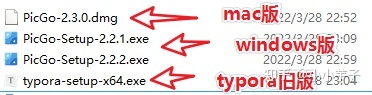
网盘地址:https://pan.baidu.com/s/1FPGezaXIZDQ1rAVNqBLCNA 提取码:isvt
下载完成,双击启动安装即可。
如果安装成功,picGo不能正常使用,则可以用兼容模式启动。【此问题因电脑而异,也是我在配置过程中踩过的坑。】
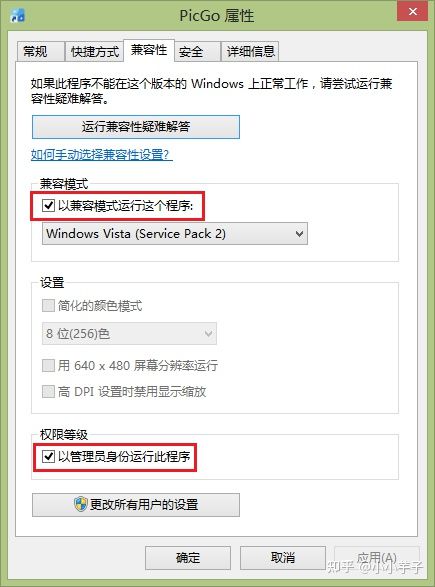
3.2 配置
仓库名:[github用户名]/[第一步新建的仓库名称]
分支:默认master,从2020.10.01开始,github的默认分支名变更为main
设定token:第一步创建的token
指定存储路径:可填可不填,如果填写了,图片就会存储在img文件夹下
图床设置 选 GitHub图床,并填写相应的信息
- 仓库名:前面新建的仓库,格式:
<用户名>/<仓库名> - 分支名:填写主分支
master即可 - Token:前面生成的token密钥
- 存储路径:按你自己的需求填写
- 自定义域名:图片上传后,PicGo 会按照
自定义域名+上传的图片名的方式生成访问链接,此处我们填写jsDelivr的CDN加速地址,格式:https://cdn.jsdelivr.net/gh/<用户名>/<仓库名>
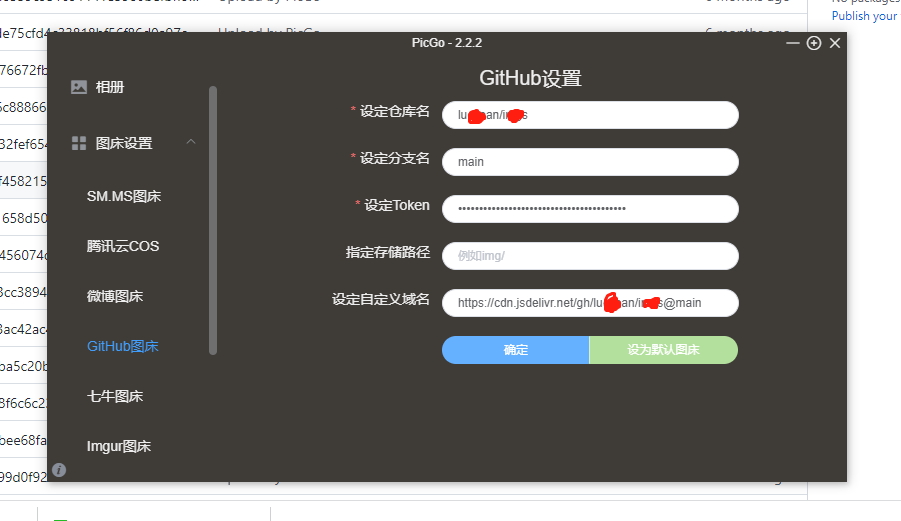
至此,github+picGo的配置完成,可以在上传区进行图片上传了。
3.3 补充几点
1.原本github的自定义域名应该是:[https://raw.githubusercontent.com/[username\]/[仓库名]](https://link.zhihu.com/?target=https%3A//raw.githubusercontent.com/[username]/[仓库名])
但是使用这种方式访问图片巨慢,所以教程中使用了jsdelivr作为cdn加速。改变域名即可,不需要任何其他配置。
2.配置完成,可能出现不能上传的情况,请大家耐心检查,也许某一步的配置出现了问题,就像检查bug一样耐心、细心。想象一下图床搭建成功后,写起文章来的丝滑感,是不是又有动力了?
4. PicGo集成Typora
使用MarkDown语法写文章,我使用的编辑器是typora,一款超级好用的编辑器。在一个编辑框内,编辑完成后,可以马上显示MarkDown语法效果。
举个栗子:

并且typora可以和picGo联合在一起使用,当你在编辑器中插入、粘贴图片时,typora+picGo的组合方式,可以自动把图片上传至github保存。
4.1 下载安装
Typora新版本是收费的,所以建议大家使用旧版本就可以了,完全能满足写作需求。
旧版本安装包和picGo放在一起了(下载地址见上文),大家按需取用即可。
下载完成后正常步骤安装即可。
4.2 配置
在typora顶部菜单界面,选择“文件” - > “偏好设置”,设置图片存储方式。
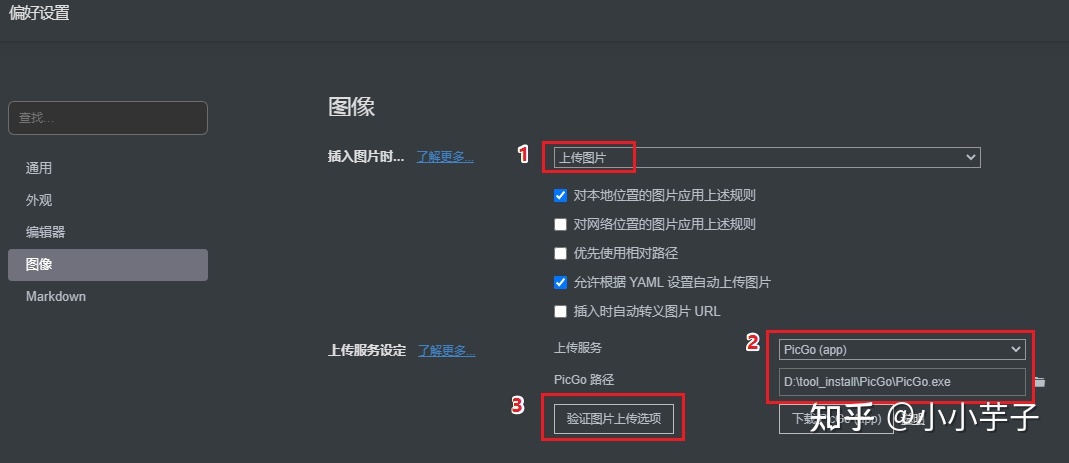
选择图片存储方式:上传图片。
上传服务:PicGo(app)
PicGo路径:picGo安装的地址
设置完成,点击“验证图片上传”,提示上传成功,即代表配置成功。
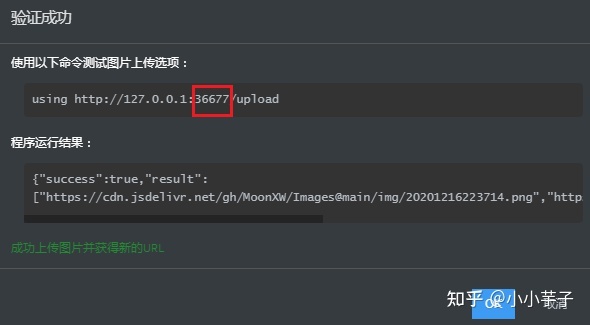
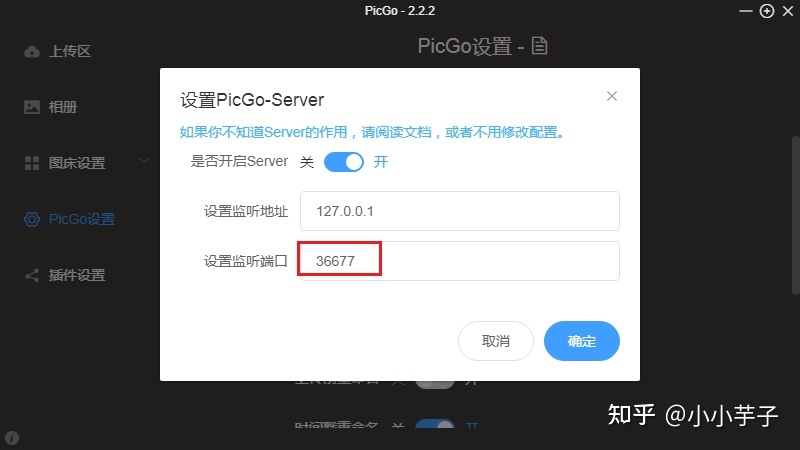
注意一点,typora图片验证中的端口,需要与picGo中的server设置内的端口一致,否则typora中不能正常上传。
4.3 picGo 图片压缩
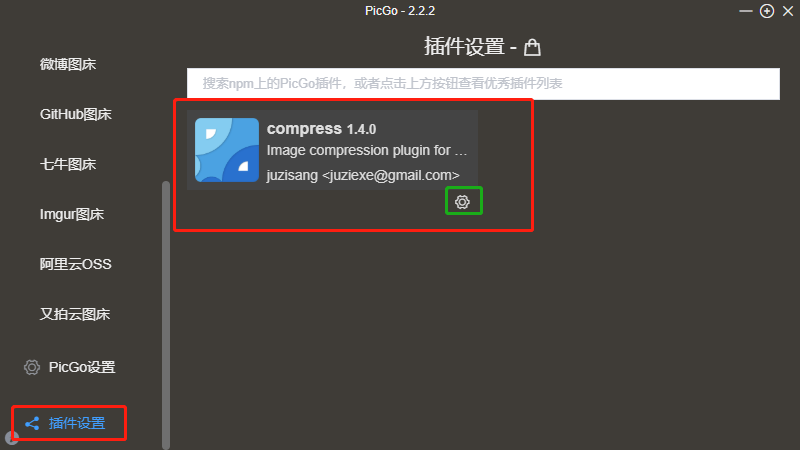
在配置项
1.启动 transformer-compress
2.启动配置 设置tinyPNG,添加keys
申请地址: https://tinypng.com/developers
上面图片 800 * 450 压缩成 10k
4.4 picGo监听端口设置
选择“PicGo设置”–>“设置server”
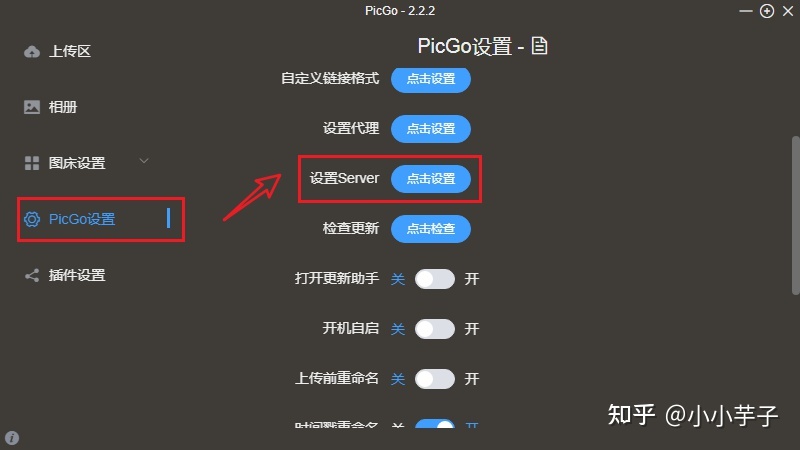
<font color="red" size="5">【此处有坑】</font>如果监听端口不是<font color="red" size="5">36677</font>,则需要修改为<font color="red" size="5">36677</font>。否则会出现picGo能正常上传 图片,而typora上传图片失败的情况。
最后,在苹果电脑中可以使用Typora+Ipic+Github的方式,有兴趣的话可以自行尝试
总结:github+picGo+typora他们三个是好基友。