
Appearance
小米 的 jpush极光
APP频繁自启动和关联启动
- APP未向用户明示未经用户同意,且无合理的使用场景,存在频繁自启动或关联启动的行为。
自动集成的处理方法
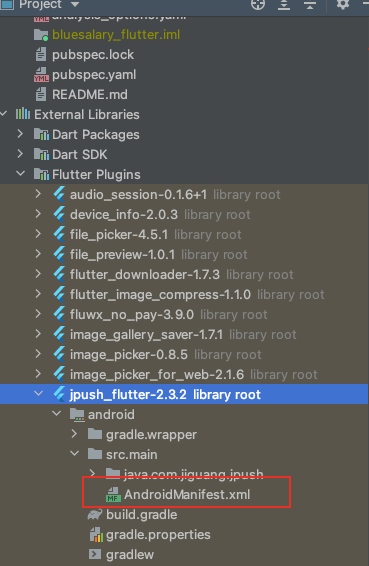
xml
<manifest xmlns:android="http://schemas.android.com/apk/res/android"
  xmlns:tools="http://schemas.android.com/tools"
  package="com.jiguang.jpush">
    <application>
        <receiver
            android:name="com.jiguang.jpush.JPushPlugin$JPushReceiver"
            android:enabled="true"
            android:exported="false">
            <intent-filter>
                <action android:name="cn.jpush.android.intent.REGISTRATION" />
                <action android:name="cn.jpush.android.intent.MESSAGE_RECEIVED" />
                <action android:name="cn.jpush.android.intent.NOTIFICATION_RECEIVED" />
                <action android:name="cn.jpush.android.intent.NOTIFICATION_OPENED" />
                <action android:name="cn.jpush.android.intent.NOTIFICATION_CLICK_ACTION" />
                <action android:name="cn.jpush.android.intent.CONNECTION" />
                <category android:name="${applicationId}" />
            </intent-filter>
        </receiver>


        <receiver
            android:name="cn.jpush.android.service.PushReceiver"
            android:enabled="true"
            android:exported="false"
            tools:node="replace">
            <intent-filter android:priority="1000">
              <action android:name="cn.jpush.android.intent.NOTIFICATION_RECEIVED_PROXY" />
              <category android:name="${applicationId}" />
            </intent-filter>
        </receiver>

        <receiver android:name="cn.jpush.android.service.AlarmReceiver" tools:node="remove"/>

        <receiver
            android:name="com.xiaomi.push.service.receivers.NetworkStatusReceiver"
            android:exported="true"
            tools:node="remove">
            <intent-filter>
              <action
                android:name="android.net.conn.CONNECTIVITY_CHANGE" />
                <category android:name="android.intent.category.DEFAULT" />
            </intent-filter>
        </receiver>

        <receiver android:name="com.jiguang.jpush.JPushEventReceiver"
            android:exported="false">
            <intent-filter>
                <action android:name="cn.jpush.android.intent.RECEIVE_MESSAGE" />
                <category android:name="${applicationId}" />
            </intent-filter>
        </receiver>


        <!-- Since JCore2.0.0 Required SDK核心功能-->
        <!-- 可配置android:process参数将Service放在其他进程中;android:enabled属性不能是false -->
        <!-- 这个是自定义Service,要继承极光JCommonService,可以在更多手机平台上使得推送通道保持的更稳定 -->
        <service android:name=".JPushCustomService"
            android:enabled="true"
            android:exported="false"
            android:process=":pushcore">
            <intent-filter>
                <action android:name="cn.jiguang.user.service.action" />
            </intent-filter>
        </service>
    </application>
    <uses-permission android:name="com.huawei.android.launcher.permission.CHANGE_BADGE"/>
</manifest>
修改的目录
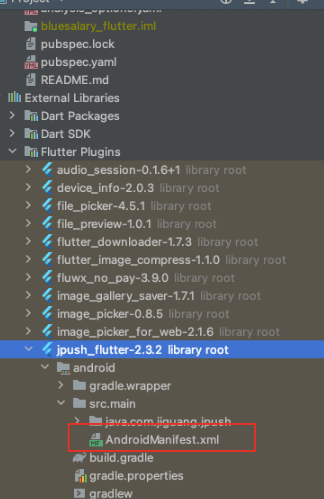
给xml文件添加下面内容
xml
<receiver
    android:name="cn.jpush.android.service.PushReceiver"
    android:enabled="true"
    android:exported="false"
    tools:node="replace">
    <intent-filter android:priority="1000">
      <action android:name="cn.jpush.android.intent.NOTIFICATION_RECEIVED_PROXY" />
      <category android:name="您应用的包名" />
    </intent-filter>
</receiver>

<receiver android:name="cn.jpush.android.service.AlarmReceiver" tools:node="remove"/>

<receiver
  	android:name="com.xiaomi.push.service.receivers.NetworkStatusReceiver"
    android:exported="true"
    tools:node="remove">
  	<intent-filter>
  		<action
      	android:name="android.net.conn.CONNECTIVITY_CHANGE" />
  			<category android:name="android.intent.category.DEFAULT" />
    </intent-filter>
</receiver>
小米需要进首页用户确定同意授权
- 弹出窗形式解决
vivo 需要有关闭推送按钮
定向推送按钮