
Appearance
* 需要稳定高速内网穿透/异地组网的用户 (访问NAS、远程桌面、联机游戏等)
* 对 Zerotier 官方节点速度不满意,想要自建Zerotier服务器的
* 注重数据安全和网络隐私,希望流量更可控
* 技术小白也能跟着操作!(UP主已把踩过的坑都填平了)
主要内容分为:
- ZeroTier PLANET 5分钟 快速私有化部署(docker)教程
- ZeroTier(及控制台) 发布教程
- 服务端及客户端使用教程及演示
- 服务器选择指南(想要ZeroTier 性能最强,那么服务器选择非常重要)
ZeroTier 与其他国产p2p内网穿透
| 功能 | ZeroTier | 其他国产 |
|---|---|---|
| 开源性 | BSL 许可限制商业使用,免费供个人、学术机构内部使用 ✔️ | 闭源 ✖️ |
| 可靠性 | 月活用户2M+ 企业用户5K+ 230+ 地区和国家使用 ✔️ | 未知不做比较 ❔ |
| 使用协议 | ZeroTier使用自研协议与 Tailscale的WireGuard 基本位于顶尖梯队 ✔️ | 未知不做比较 ❔ |
| 国内使用 | 官方的服务器在海外,我们连接的时候会存在不稳定的情况 ✖️ | 国内优化较好 ✔️ |
| 私有化部署 | 允许自建moon节点及大佬开发的私有化PLANET节点及管理界面✔️ | 未知不做比较 ❔ |
🚀 私有化部署(PLANET)对比官方的优势:
⚡ 显著提升连接速度和稳定性!* 告别卡顿和延迟,完全告别官方服务器。(自建moon节点任然会与官方PLANET 节点通信)
🔒 增强安全性与隐私性!* 所有节点掌握在自己手中。
🛡️ 网络自主可控!* 不再依赖第三方公共服务器。
💰 依然是免费的!* (服务器成本需自行承担,通常非常低)
*💰突破设备限制! 让你随心所欲加设备,创建网络
项目地址:https://gitee.com/little-dark-tony/docker-zerotier-palnet
ZZeroTier PLANET 快速私有化部署(docker)教程
服务器配置说明:
| 配置项 | 参数 |
|---|---|
| cpu | 1C |
| 内存 | 1G |
| 系统 | Ubuntu 24.04 任意linux系统(建议直接放在云服务器) |
docker部署教程
安装docker
见本站docker安装教程:https://halo.blog360.sbs/archives/dockeran-zhuang-jiao-cheng
ZeroTier 镜像下载容器启动
下载项目源码
官方地址
crmsh
git clone https://gitee.com/little-dark-tony/docker-zerotier-palnet.git
git clone git@gitee.com:luckean/docker-zerotier-palnet.git
执行安装脚本
进入项目目录
bash
cd docker-zerotier-planet运行 deploy.sh 脚本
bash
# 没权限执行
chmod +x deploy.sh
./deploy.sh
根据提示来选择即可,操作完成后会自动部署
markdown
欢迎使用zerotier-planet脚本,请选择需要执行的操作:
1. 安装
2. 更新
其他任意键退出
整个脚本预计需要 3-10 分钟,具体需要看网络与机型
过程中可能出现问题:
- alpinelinux.org包下载失败,原因为镜像源不可用
bash
 => ERROR [builder 4/5] RUN mkdir -p /var/cache/apk && chmod 777 /var/cache/apk     && sed -i 's/dl-cdn.alpinelinux.org/mirrors.tuna.tsinghua.edu.cn/g' /etc/apk/repositories  1.3s
------
 > [builder 4/5] RUN mkdir -p /var/cache/apk && chmod 777 /var/cache/apk     && sed -i 's/dl-cdn.alpinelinux.org/mirrors.tuna.tsinghua.edu.cn/g' /etc/apk/repositories     && apk update    && mkdir -p /usr/include/nlohmann/ && cd /usr/include/nlohmann/ && wget https://ghproxy.markxu.online/https://github.com/nlohmann/json/releases/download/v3.10.5/json.hpp     && apk add --no-cache git python3 npm make g++ zerotier-one linux-headers    && mkdir /app -p &&  cd /app && git clone --progress https://ghproxy.markxu.online/https://github.com/key-networks/ztncui.git    && cd /app/ztncui/src     && cp /app/patch/binding.gyp .    && echo "开始配置npm环境"    && npm install -g --progress --verbose node-gyp --registry=https://registry.npmmirror.com    && npm install  --registry=https://registry.npmmirror.com    && echo 'HTTP_PORT=3443' >.env     && echo 'NODE_ENV=production' >>.env     && echo 'HTTP_ALL_INTERFACES=true' >>.env     && echo "ZT_ADDR=localhost:9995" >>.env    && echo "9995" >/app/zerotier-one.port     && cp -v etc/default.passwd etc/passwd:
0.457 fetch https://mirrors.tuna.tsinghua.edu.cn/alpine/v3.17/main/x86_64/APKINDEX.tar.gz
0.885 fetch https://mirrors.tuna.tsinghua.edu.cn/alpine/v3.17/community/x86_64/APKINDEX.tar.gz
0.887 WARNING: updating and opening https://mirrors.tuna.tsinghua.edu.cn/alpine/v3.17/main: Permission denied
1.217 WARNING: updating and opening https://mirrors.tuna.tsinghua.edu.cn/alpine/v3.17/community: Permission denied
修改Dockerfile为阿里mirrors.aliyun.com或者其他国内镜像源
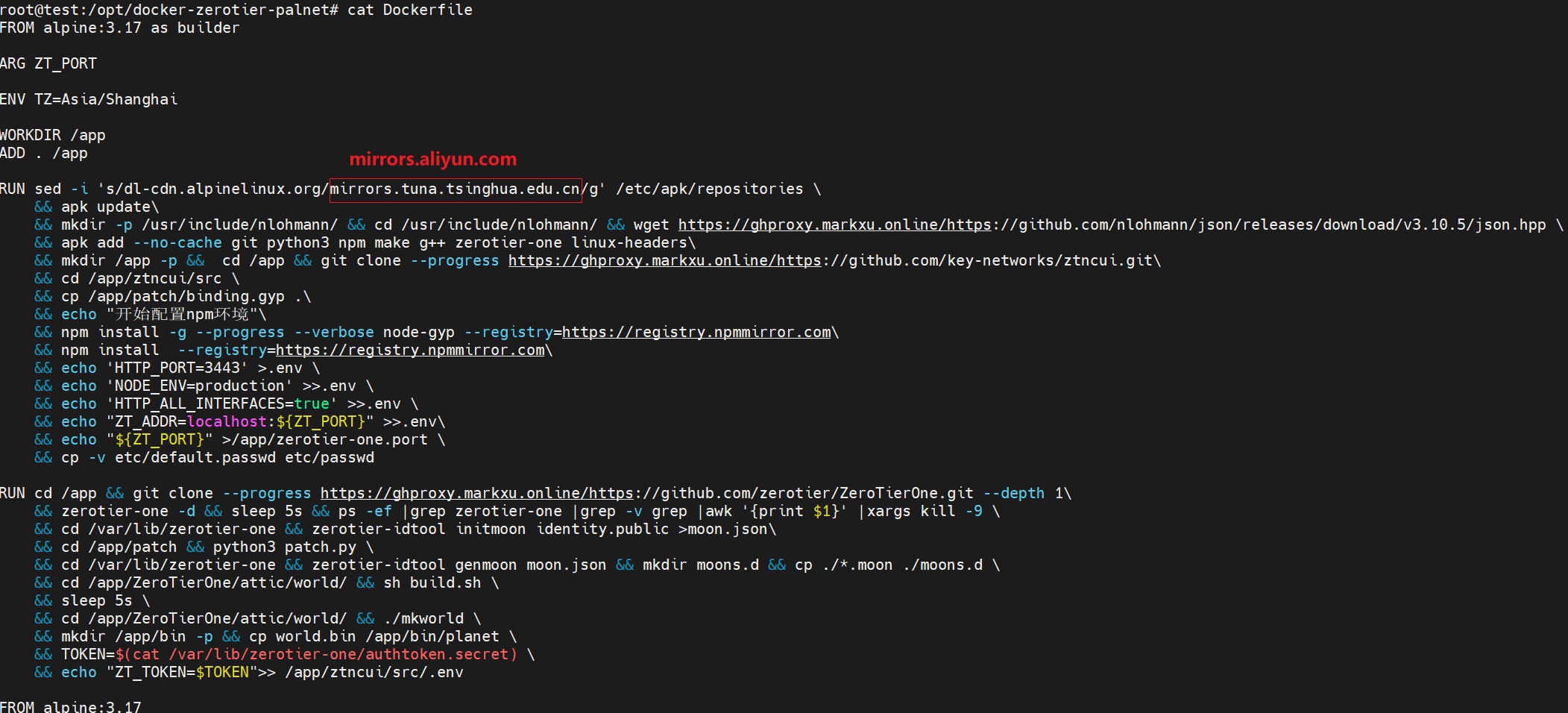
- ghproxy.markxu.online github加速代理不可以。
bash
 => ERROR [builder 4/5] RUN sed -i 's/dl-cdn.alpinelinux.org/mirrors.aliyun.com/g' /etc/apk/repositories     && apk update    && mkdir -p /usr/include/nlohmann/ && cd /usr/i  2.4s
------
 > [builder 4/5] RUN sed -i 's/dl-cdn.alpinelinux.org/mirrors.aliyun.com/g' /etc/apk/repositories     && apk update    && mkdir -p /usr/include/nlohmann/ && cd /usr/include/nlohmann/ && wget https://ghproxy.markxu.online/https://github.com/nlohmann/json/releases/download/v3.10.5/json.hpp     && apk add --no-cache git python3 npm make g++ zerotier-one linux-headers    && mkdir /app -p &&  cd /app && git clone --progress https://ghproxy.markxu.online/https://github.com/key-networks/ztncui.git    && cd /app/ztncui/src     && cp /app/patch/binding.gyp .    && echo "开始配置npm环境"    && npm install -g --progress --verbose node-gyp --registry=https://registry.npmmirror.com    && npm install  --registry=https://registry.npmmirror.com    && echo 'HTTP_PORT=3443' >.env     && echo 'NODE_ENV=production' >>.env     && echo 'HTTP_ALL_INTERFACES=true' >>.env     && echo "ZT_ADDR=localhost:9995" >>.env    && echo "9995" >/app/zerotier-one.port     && cp -v etc/default.passwd etc/passwd:
0.463 fetch https://mirrors.aliyun.com/alpine/v3.17/main/x86_64/APKINDEX.tar.gz
1.202 fetch https://mirrors.aliyun.com/alpine/v3.17/community/x86_64/APKINDEX.tar.gz
2.250 v3.17.10-89-gdbdf15a18fd [https://mirrors.aliyun.com/alpine/v3.17/main]
2.250 v3.17.10-83-g9fde517a01c [https://mirrors.aliyun.com/alpine/v3.17/community]
2.250 OK: 17824 distinct packages available
2.346 wget: bad address 'ghproxy.markxu.online'
修改代理源或者直接访问下载:
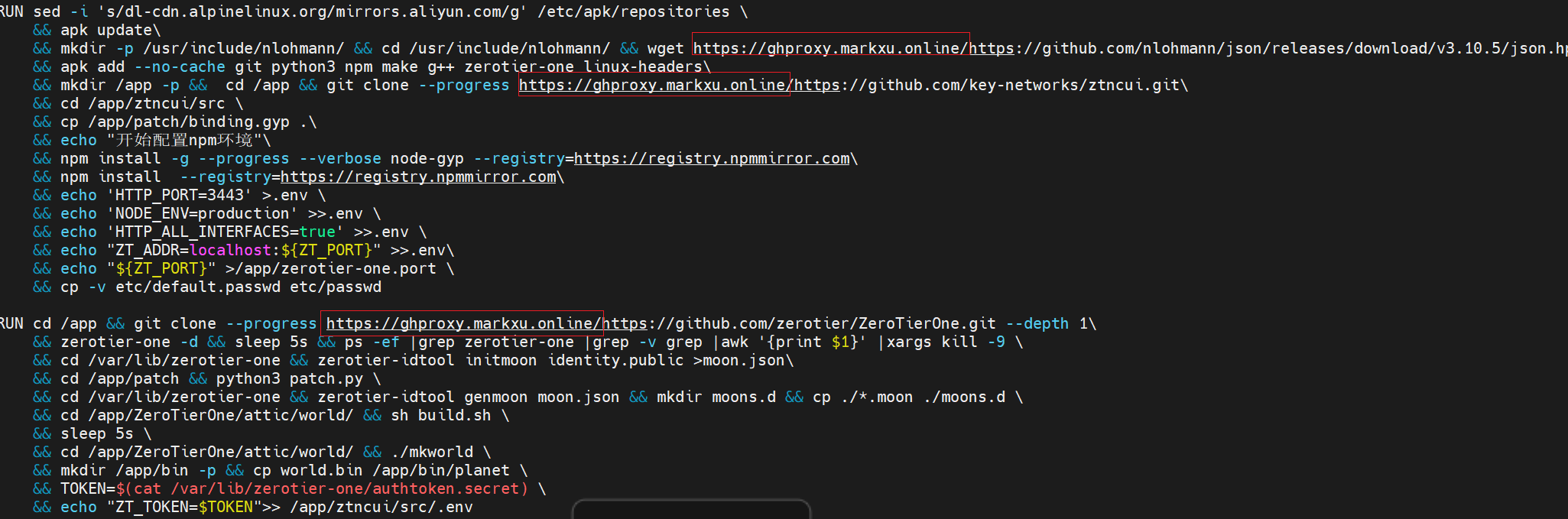
国内代理源可以去2025年07月更新!18个Github镜像站,国内更快部署下载或者Github Proxy 文件代理加速修改可用镜像源
- ZeroTierOne核心部件丢失
bash
  => ERROR [builder 5/5] RUN cd /app && git clone --progress https://gh.bugdey.us.kg/https://github.com/zerotier/ZeroTierOne.git --depth 1    && zerotier-one -d && sleep 5s   53.4s ------                                                                                                                                                                               > [builder 5/5] RUN cd /app && git clone --progress https://gh.bugdey.us.kg/https://github.com/zerotier/ZeroTierOne.git --depth 1    && zerotier-one -d && sleep 5s && ps -ef |grep zerotier-one |grep -v grep |awk '{print $1}' |xargs kill -9     && cd /var/lib/zerotier-one && zerotier-idtool initmoon identity.public >moon.json    && cd /app/patch && python3 patch.py     && cd /var/lib/zerotier-one && zerotier-idtool genmoon moon.json && mkdir moons.d && cp ./*.moon ./moons.d     && cd /app/ZeroTierOne/attic/world/ && sh build.sh     && sleep 5s     && cd /app/ZeroTierOne/attic/world/ && ./mkworld     && mkdir /app/bin -p && cp world.bin /app/bin/planet     && TOKEN=$(cat /var/lib/zerotier-one/authtoken.secret)     && echo "ZT_TOKEN=$TOKEN">> /app/ztncui/src/.env:
0.316 Cloning into 'ZeroTierOne'...
2.105 remote: Enumerating objects: 1497, done.
remote: Counting objects: 100% (1497/1497), done.
remote: Compressing objects: 100% (1192/1192), done.
remote: Total 1497 (delta 253), reused 1128 (delta 215), pack-reused 0 (from 0)
Receiving objects: 100% (1497/1497), 9.57 MiB | 264.00 KiB/s, done.
Resolving deltas: 100% (253/253), done.
45.03 修改后的moon
45.03 {'id': 'cacc42ed55', 'objtype': 'world', 'roots': [{'identity': 'cacc42ed55:0:a25e32013f135605e3445af56834e635e4482826cc40e030eb9bb5729b63f015c469d201578cfb38329445a56e71e87ef2f906516c2dc5945457f35d0803bd42', 'stableEndpoints': ['1.1.1.1/9995']}], 'signingKey': 'e9646b76f7975c83654f68ca51e3218dd86bd3d19491fa8e558d41beacbe3e0a0fee552578c5127df107ad3cf93bc04023b9b9f9b653d17e049592bed8ebb5ed', 'signingKey_SECRET': '5ad947f13202dd75ddb4fceed73fcb9ea7a30fa10e5a7d6c578daa13c7c57d290ce9faf244523a6d5414f61108cd979893633a0b91c294783c6a38fed07ab9c1', 'updatesMustBeSignedBy': 'e9646b76f7975c83654f68ca51e3218dd86bd3d19491fa8e558d41beacbe3e0a0fee552578c5127df107ad3cf93bc04023b9b9f9b653d17e049592bed8ebb5ed', 'worldType': 'moon'}
45.05 wrote 000000cacc42ed55.moon (signed world with timestamp 1752806183405)
45.06 cc1plus: fatal error: ../../node/C25519.cpp: No such file or directory
45.06 compilation terminated.
53.27 mkworld.cpp:46:10: fatal error: node/C25519.hpp: No such file or directory
53.27    46 | #include <node/C25519.hpp>
53.27       |          ^~~~~~~~~~~~~~~~~
53.27 compilation terminated.ZeroTierOne默认下载为dev分支可能是bug或者更新了给核心部件C25519.hpp没了,clone指定版本tag --branch 参数
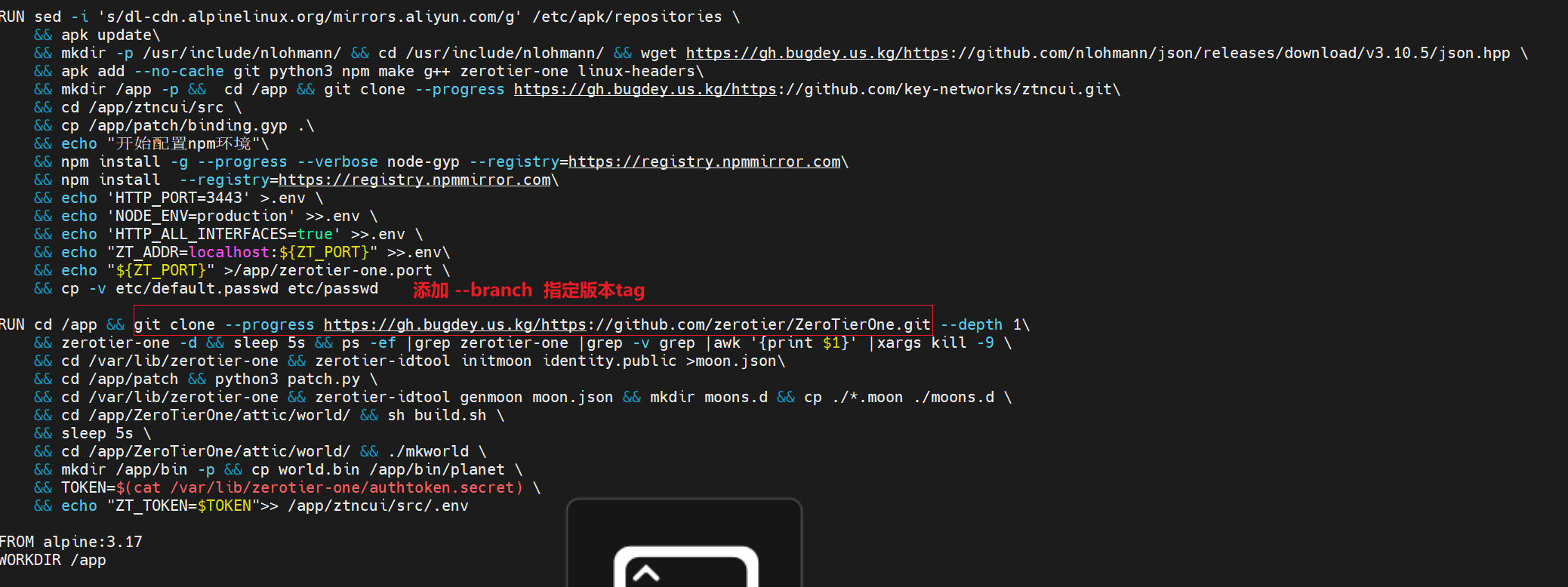 添加*--branch 1.14.2 最新tag版本到git命令中*
调整完成DockerFile
dockerfile
FROM alpine:3.17 as builder

ARG ZT_PORT

ENV TZ=Asia/Shanghai

WORKDIR /app
ADD . /app

RUN sed -i 's/dl-cdn.alpinelinux.org/mirrors.aliyun.com/g' /etc/apk/repositories \
    && apk update\
    && mkdir -p /usr/include/nlohmann/ && cd /usr/include/nlohmann/ && wget https://github.com/nlohmann/json/releases/download/v3.10.5/json.hpp \
    && apk add --no-cache git python3 npm make g++ zerotier-one linux-headers\
    && mkdir /app -p &&  cd /app && git clone --progress https://github.com/key-networks/ztncui.git\
    && cd /app/ztncui/src \
    && cp /app/patch/binding.gyp .\
    && echo "开始配置npm环境"\
    && npm install -g --progress --verbose node-gyp --registry=https://registry.npmmirror.com\
    && npm install  --registry=https://registry.npmmirror.com\
    && echo 'HTTP_PORT=3443' >.env \
    && echo 'NODE_ENV=production' >>.env \
    && echo 'HTTP_ALL_INTERFACES=true' >>.env \
    && echo "ZT_ADDR=localhost:${ZT_PORT}" >>.env\
    && echo "${ZT_PORT}" >/app/zerotier-one.port \
    && cp -v etc/default.passwd etc/passwd

RUN cd /app && git clone --branch 1.14.2  --progress https://github.com/zerotier/ZeroTierOne.git --depth 1\
    && zerotier-one -d && sleep 5s && ps -ef |grep zerotier-one |grep -v grep |awk '{print $1}' |xargs kill -9 \
    && cd /var/lib/zerotier-one && zerotier-idtool initmoon identity.public >moon.json\
    && cd /app/patch && python3 patch.py \
    && cd /var/lib/zerotier-one && zerotier-idtool genmoon moon.json && mkdir moons.d && cp ./*.moon ./moons.d \
    && cd /app/ZeroTierOne/attic/world/ && sh build.sh \
    && sleep 5s \
    && cd /app/ZeroTierOne/attic/world/ && ./mkworld \
    && mkdir /app/bin -p && cp world.bin /app/bin/planet \
    && TOKEN=$(cat /var/lib/zerotier-one/authtoken.secret) \
    && echo "ZT_TOKEN=$TOKEN">> /app/ztncui/src/.env

FROM alpine:3.17
WORKDIR /app

COPY --from=builder /app/ztncui /app/ztncui
COPY --from=builder /app/bin /app/bin
COPY --from=builder /app/zerotier-one.port /app/zerotier-one.port
COPY --from=builder /var/lib/zerotier-one /var/lib/zerotier-one

RUN sed -i 's/dl-cdn.alpinelinux.org/mirrors.aliyun.com/g' /etc/apk/repositories \
    && apk update\
    && apk add --no-cache npm zerotier-one

VOLUME [ "/app","/var/lib/zerotier-one" ]

CMD /bin/sh -c "cd /var/lib/zerotier-one && ./zerotier-one -p`cat /app/zerotier-one.port` -d; cd /app/ztncui/src;npm start"
*** Luckean git调整好并使用过,上面没加github代理,可能会失败 **.
当您看到类似如下字样时,表示安装成功
axapta
启动服务
3b59df95edabeabbf19aa6605b28704608710719bdf7c6e7612d75d01ede8f48
Preparing to copy...
Copying from container - 512B
Copying from container - 769B
Copying from container - 1.024kB
Copying from container - 1.536kB
Successfully copied 2.048kB to /tmp/planet
planet文件路径为 /tmp/planet
planet server端口为: 9994, 请在防火墙放行该端口的tcp和udp协议
enjoy~
下载 planet 文件
脚本运行完成后,会在 /tmp/ 目录下有个 planet 文件
下载该文件以备用
ZeroTier(及控制台) 发布教程
开放端口说明
| 端口 | 说明 |
|---|---|
| 9993/tcp | ZeroTier 连接端口 |
| 9993/udp | ZeroTier p2p端口 |
| 3443/tcp | 控制台web端口,建议使用代理发布80或者443 |
修改9996, 3446
web端口发布
在/etc/nginx/sites-available添加新域名配置文件,*vim 你的域名*
perl
server {

    listen 80;
    server_name test.blog360.sbs;
    #    return 404; # managed by Certbot

     location / {
                client_max_body_size 50m;
                proxy_set_header Host $host;
                proxy_set_header X-Real-IP $remote_addr;
                proxy_set_header X-Forwarded-For $proxy_add_x_forwarded_for;
                proxy_pass http://172.30.0.2:3443/; #后端 真实服务器

                index index.html index.htm A1-index.html;

  }


}
建立软连接
awk
ln -s /etc/nginx/sites-available/你的域名 /etc/nginx/sites-enabled/你的域名web端口申请免费证书(ssl证书可选)
安装Certbot工具
bash
# Ubuntu/Debian
sudo apt update
sudo apt install certbot python3-certbot-nginx

# CentOS/RHEL
sudo yum install epel-release
sudo yum install certbot python3-certbot-nginx
申请ssl证书(nginx)
ada
sudo certbot --nginx -d your-domain.com- 替换
your-domain.com为你的域名
验证
页面打开 访问 http://ip:3443 进入controller页面
任意服务器telnet
apache
telnet ip 9993服务端及客户端使用教程及演示
服务端使用教程
登录控制面板,修改密码
页面打开 访问 http://ip:3443 进入controller页面,默认使用默认账号为:admin 默认密码为:password
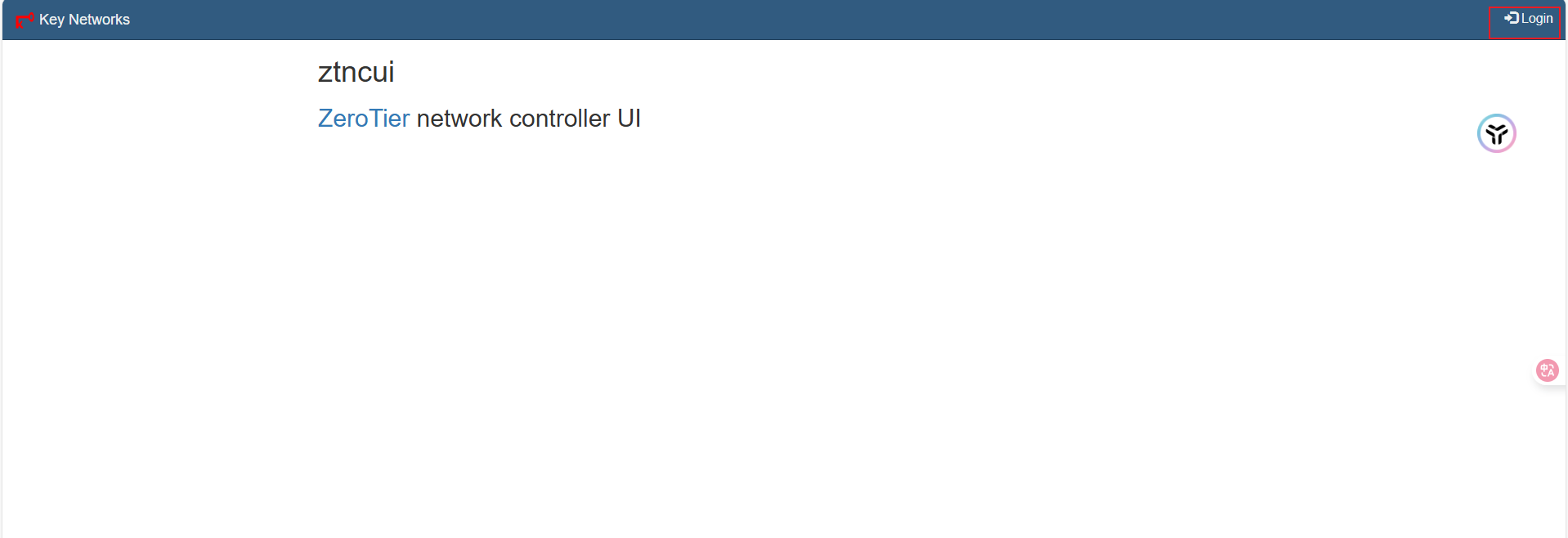
登录完成后修改且保存密码
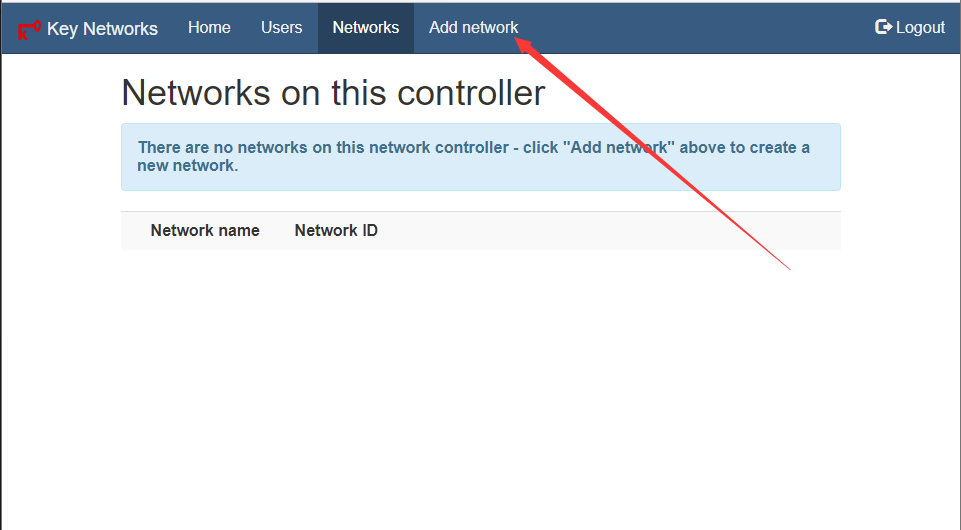
创建网络
创建网络,输入名称:
得到网络 id
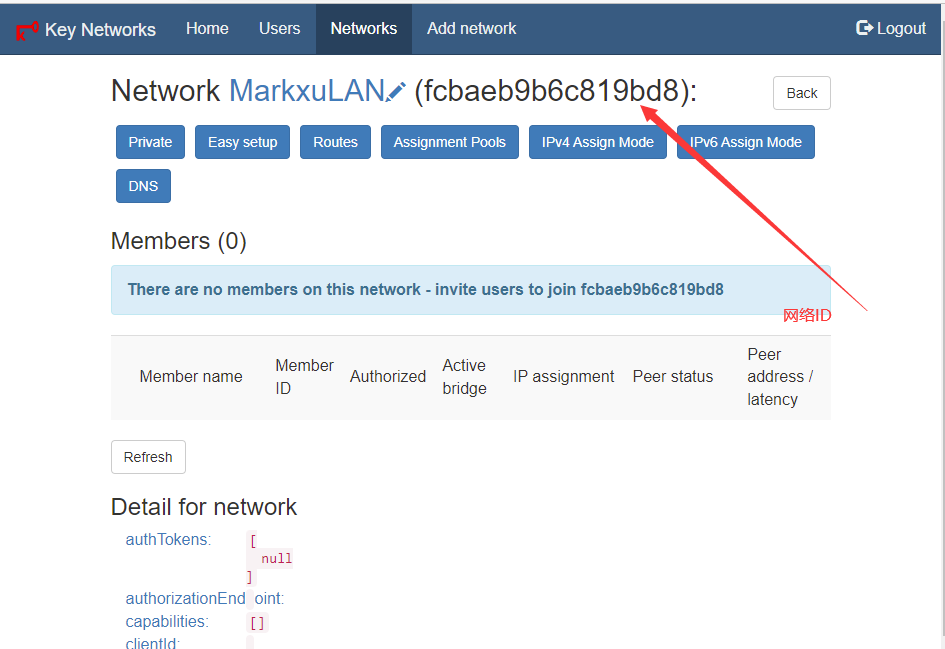
修改网络配置
与官方一致,按需参照以下配置修改

客户端使用教程
支持的客户端
除了IOS 其他与官方支持基本一致
| 客户端 | 官方 | 自建 |
|---|---|---|
| ios | ✔️ | ✖️ |
| 安卓 | ✔️ | ✔️ |
| mac | ✔️ | ✔️ |
| win | ✔️ | ✔️ |
| linux | ✔️ | ✔️ |
| 其他 | ✔️ | ❔ |
linux\win\mac\FreeBSD 使用教程
使用方法一致,前往安装路径,备份官方的*planet*文件,导入自建的planet文件,系统默认安装路径如下:
| 系统 | 默认安装路径 |
|---|---|
| Win | C:\ProgramData\ZeroTier\One #隐藏目录 |
| Linux | /var/lib/zerotier-one |
| mac | /Library/Application Support/ZeroTier/One (在 Terminal 中应为 /Library/Application\ Support/ZeroTier/One) |
| FreeBSD/OpenBSD | /var/db/zerotier-one |
重启服务:
- win重启服务
Win+S 搜索 服务
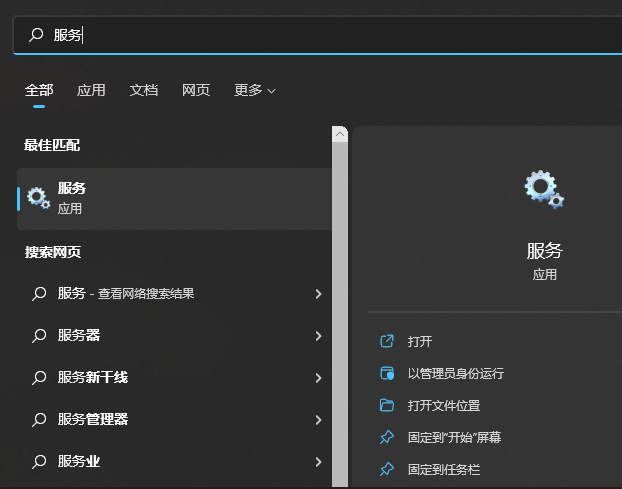 找到ZeroTier One,并且重启服务
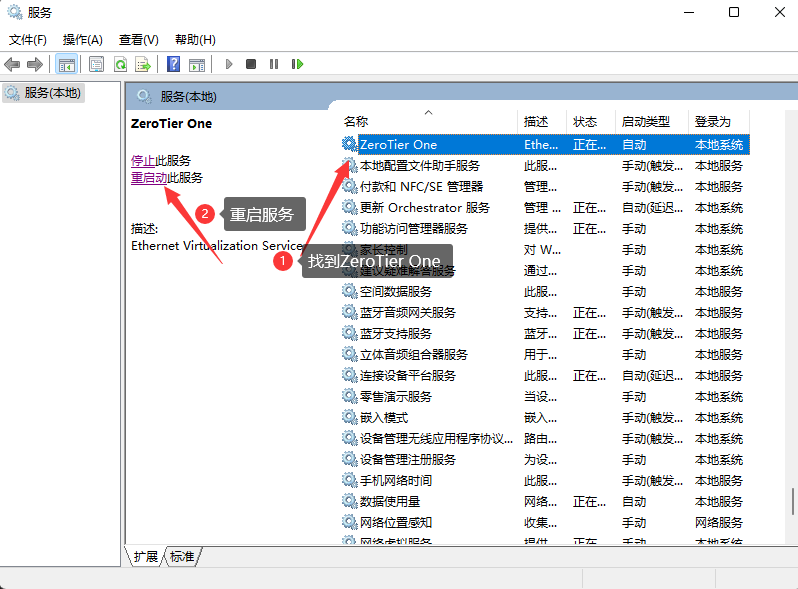
- linux重启服务
进入服务器,配置文件重启
stata
cd  /var/lib/zerotier-one
# 替换目录下的 planet 文件
# 重启 zerotier-one 服务(service zerotier-one restart)
systemctl restart zerotier-one- mac重启服务
stata
#进入 /Library/Application\ Support/ZeroTier/One/ 目录,并替换目录下的 planet 文件
#重启 ZeroTier-One:cat /Library/Application\ Support/ZeroTier/One/zerotier-one.pid | sudo xargs kill
cat /Library/Application\ Support/ZeroTier/One/zerotier-one.pid | sudo xargs kill
加入网络
使用命令行或者界面操作
bash
zerotier-cli join 网络 id验证
执行命令
apache
zerotier-cli peers
<ztaddr>   <ver>  <role> <lat> <link> <lastTX> <lastRX> <path>
fcbaeb9b6c 1.8.7  PLANET    52 DIRECT 16       8994     1.1.1.1/9993
fe92971aad 1.8.7 LEAF 14 DIRECT -1 4150 2.2.2.2/9993仅有一个PLANET节点,且该节点为你的公网服务器ip和端口,连接方式均为 DIRECT(直连),及为配置完成
安卓使用教程
下载非官方客户端ZerotierFix,前往GitHub下载地址:Releases · kaaass/ZerotierFix
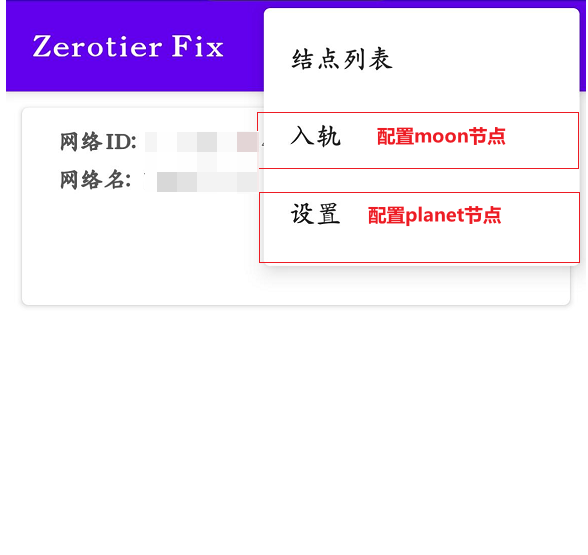
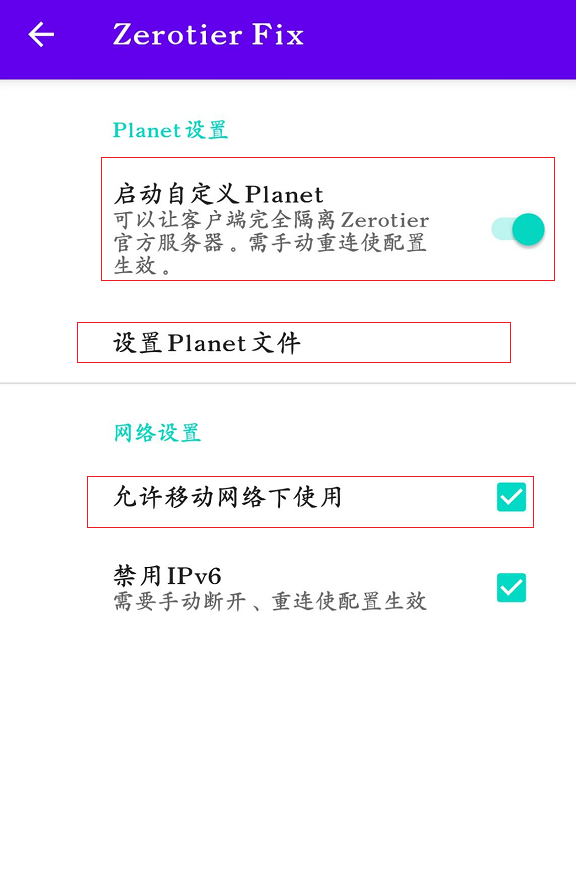
安装app,配置自建PLANET节点接入
导入PLANET文件,配置自建planet节点
点击入轨,配置自建moon节点

服务器选择指南
硬件需求
| 配置 | 需求 | 描述 |
|---|---|---|
| cpu | 1c | 基本忽略 |
| 内存 | 512M | 基本忽略 |
| 网络 | 1 M | 基本忽略,按需越大越好,再p2p失败后需要使用服务器中继 |
所以说任意云服务器厂商所提供的vps都可以满足需求
网络选择
在所有配置中,网络是影响性能的最大因素,以表格优先级排行
| 因素排行 | 原因 | 描述 |
|---|---|---|
| 地域 | 物理延迟最低 | 优先物理延迟,如果跨大区域则选择其中一个区域,实在不行就选择中间区 |
| 运营商 | 跨运营商会影响网络 | 选择常用核心设备运营商,如果都有就选电信 |
| 带宽 | 需求最低 | 中继会使用到服务器带宽 |
影响延迟因素:地域 > 运营商 > 带宽 在一定情况下例如同一地域下:运营商 > 地域 > 带宽
例1
场景:
- 公司A部门在深圳,主要宽带使用的是电信宽带
- 公司B部门在广州佛山,主要宽带使用的是电信宽带
- A部门宽带直pingB部门宽带临时ip延迟为20 ms
那么在这个场景下,应当选择广州/电信 宽带或者云服务器,假设A部门宽带直ping云服务器为25 ms,B部门宽带直ping云服务为19 ms
结果:
以下为理论结果,实际会有20%左右波动
| 状态 | 延迟 | 描述 |
|---|---|---|
| DIRECT (直连) | 20 ms | A ping B 理论延迟为直连既20 ms 左右波动 |
| RELAY (中继) | 44 ms | A ping B 理论延迟为 A -> 云服务器 + B -> 云服务器 为44 ms左右波动 |
注意:客户端执行zerotier-cli peers命令即可查看客户端网络状态
tap
网络延迟波动图 (单位:ms)
50 ┼                                                      ╭─╮
45 ┼             ╭─╮                    ╭─╮             ╭─╯ │
44 ┼╭─╮          │ ╰╮        ╭─╮       │ ╰╮          ╭─╯   │ 最差阈值(RELAY)
40 ┼│ ╰╮         │  │       ╭╯ ╰╮      │  ╰╮         │     │
35 ┼│  │        ╭╯  │       │   │     ╭╯   ╰╮        │     │
30 ┼│  ╰╮       │   │      ╭╯   │     │     │       ╭╯     │
25 ┼│   │      ╭╯   ╰╮     │    ╰╮    │     │       │      │
20 ┼╯   ╰──────╯     ╰─────╯     ╰────╯     ╰───────╯      ╰── 最佳阈值(DIRECT)
15 ┼
 0 ┼───────────────────────────────────────────────────────────
   0   5   10   15   20   25   30   35   40   45   50   55   60 (时间/秒)
例2
场景:
A小伙伴在深圳,主要宽带使用的是电信宽带
B小伙伴在长沙,主要宽带使用的是长沙联通
C小伙伴在北京,主要使用的是北京移动
A宽带直pingB宽带临时ip延迟为50 ms
B宽带直pingC宽带临时ip延迟为60 ms
A宽带直pingC宽带临时ip延迟为70 ms
那么在这个场景下,最佳选择有
- 广州/电信 宽带或者云服务器
- 长沙/联通 宽带或者云服务器
- 北京/移动 宽带或者云服务器
假设我们选择了1广州/电信 宽带或者云服务器,且ABC到服务器带宽 20 ms、40 ms、60 ms
A小伙伴结果:
以下为理论结果,实际会有20%左右波动
| 状态 | 延迟 | 描述 |
|---|---|---|
| DIRECT (直连) | 50ms - 70 ms | A ping B 理论延迟为直连既50 ms 与C 的ping为70 ms 左右波动 |
| RELAY (中继) | 60 ms - 80 ms | A ping B 理论延迟为 A -> 云服务器(20ms) + B -> 云服务器(40ms) 为60ms左右波动,A ping B 理论延迟为 A -> 云服务器(20ms) + B -> 云服务器(60ms) 为80ms左右波动 |
注意:客户端执行zerotier-cli peers命令即可查看客户端网络状态