
Appearance
开发规范
本项目基于 Vben Admin 5.x 进行二次开发,采用 Vue 3 + TypeScript + Vite 技术栈,支持 Ant Design Vue(antd)、Element Plus(ele)、Naive 等主流 UI 库。
官方文档
强烈建议先阅读 Vben Admin 官方文档,了解框架的基础概念和使用方式:
- 《关于 Vben Admin》 - 了解框架特点、浏览器支持、如何参与贡献等
- 《为什么选择我们?》 - 了解框架历程、单元测试、代码质量与规范等
- 《基础概念》 - 了解大仓、应用、包、别名等核心概念
- 《本地开发》 - 了解如何启动和开发项目
- 《配置》 - 了解环境变量配置、生产环境动态配置、偏好设置等
0. 实战案例
本小节,提供大家开发管理后台的功能时,最常用的分页列表、树形列表、新增与修改的表单弹窗、详情表单弹窗的实战案例。
0.1 分页列表
可参考 [系统管理 -> 岗位管理] 菜单: | 文件类型 | antd 版本 | ele 版本 | | API 接口 | apps/web-antd/src/api/system/post/index.ts | apps/web-ele/src/api/system/post/index.ts | | 列表界面 | apps/web-antd/src/views/system/post/index.vue | apps/web-ele/src/views/system/post/index.vue | | 表单界面 | apps/web-antd/src/views/system/post/modules/form.vue | apps/web-ele/src/views/system/post/modules/form.vue | | 数据配置 | apps/web-antd/src/views/system/post/data.ts | apps/web-ele/src/views/system/post/data.ts |
为什么界面拆成列表和表单两个 Vue 文件?
每个 Vue 文件,只实现一个功能,更简洁,维护性更好,Git 代码冲突概率低。
具体可见本文的「3.3 页面级组件」。
其中,data.ts 用于定义表格列配置、搜索表单配置、新增/修改表单配置等,将配置与业务逻辑分离,提高代码可维护性。整体结构,如下图所示:
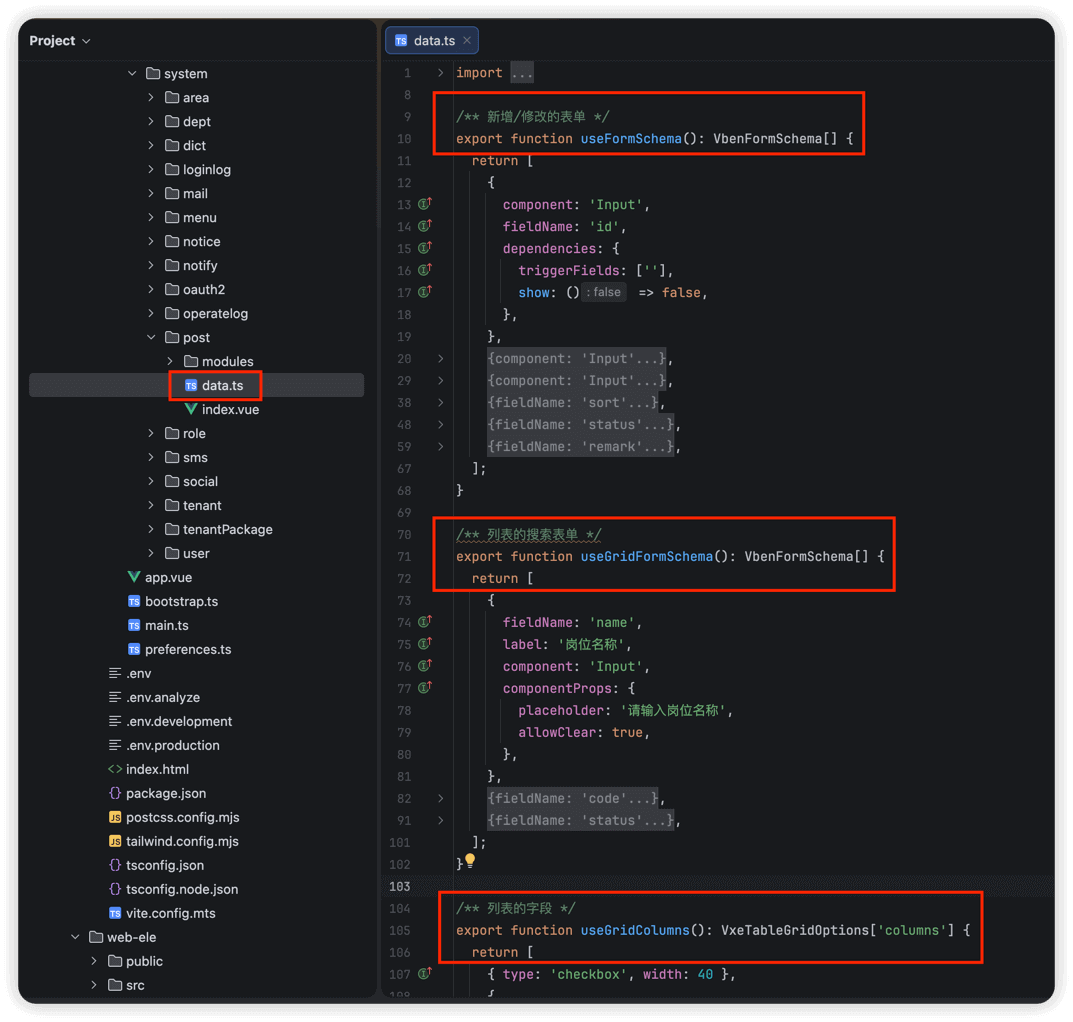
- Vben Vxe Table 表格
- Vben Form 表单
- Vben Modal 模态框 另外,项目在
src/adapter目录下对表单和表格进行了扩展配置: | 文件类型 | antd 版本 | ele 版本 | | 表单适配器 | apps/web-antd/src/adapter/form.ts | apps/web-ele/src/adapter/form.ts | | 表格适配器 | apps/web-antd/src/adapter/vxe-table.ts | apps/web-ele/src/adapter/vxe-table.ts |
① form.ts 中定义了自定义校验规则,可在表单 Schema 的 rules 属性中使用:
required- 输入项必填校验selectRequired- 选择项必填校验mobile- 手机号格式校验(非必填)mobileRequired- 手机号格式校验(必填) ②vxe-table.ts中定义了自定义单元格渲染器和格式化器:
单元格渲染器(cellRender):
CellImage- 图片渲染CellImages- 多图片渲染CellLink- 链接按钮CellTag- 标签渲染CellTags- 多标签渲染CellDict- 字典标签渲染,如cellRender: { name: 'CellDict', props: { type: 'system_user_sex' } }CellSwitch- 开关渲染,支持异步切换CellOperation- 操作按钮渲染,如cellRender: { name: 'CellOperation', options: ['edit', 'delete'] }格式化器(formatter):formatPast2- 相对时间格式化(如"3 天前")formatAmount3- 数量格式化,保留 3 位小数formatAmount2- 数量格式化,保留 2 位小数formatFenToYuanAmount- 分转元格式化formatFileSize- 文件大小格式化
0.2 树形列表
可参考 [系统管理 -> 部门管理] 菜单: | 文件类型 | antd 版本 | ele 版本 | | API 接口 | apps/web-antd/src/api/system/dept/index.ts | apps/web-ele/src/api/system/dept/index.ts | | 列表界面 | apps/web-antd/src/views/system/dept/index.vue | apps/web-ele/src/views/system/dept/index.vue | | 表单界面 | apps/web-antd/src/views/system/dept/modules/form.vue | apps/web-ele/src/views/system/dept/modules/form.vue | | 数据配置 | apps/web-antd/src/views/system/dept/data.ts | apps/web-ele/src/views/system/dept/data.ts |
0.3 详情弹窗
可参考 [基础设施 -> API 日志 -> 访问日志] 菜单: | 文件类型 | antd 版本 | ele 版本 | | 列表界面 | apps/web-antd/src/views/infra/apiAccessLog/index.vue | apps/web-ele/src/views/infra/apiAccessLog/index.vue | | 详情弹窗 | apps/web-antd/src/views/infra/apiAccessLog/modules/detail.vue | apps/web-ele/src/views/infra/apiAccessLog/modules/detail.vue | | 数据配置 | apps/web-antd/src/views/infra/apiAccessLog/data.ts | apps/web-ele/src/views/infra/apiAccessLog/data.ts |
详情弹窗,使用 useVbenModal 和 useDescription 组合实现,data.ts 中通过 useDetailSchema() 定义详情字段的展示配置。
1. view 页面
在 apps/web-antd/src/views 或 apps/web-ele/src/views 目录下,每个模块对应一个目录,它的所有功能的 .vue 都放在该目录里。
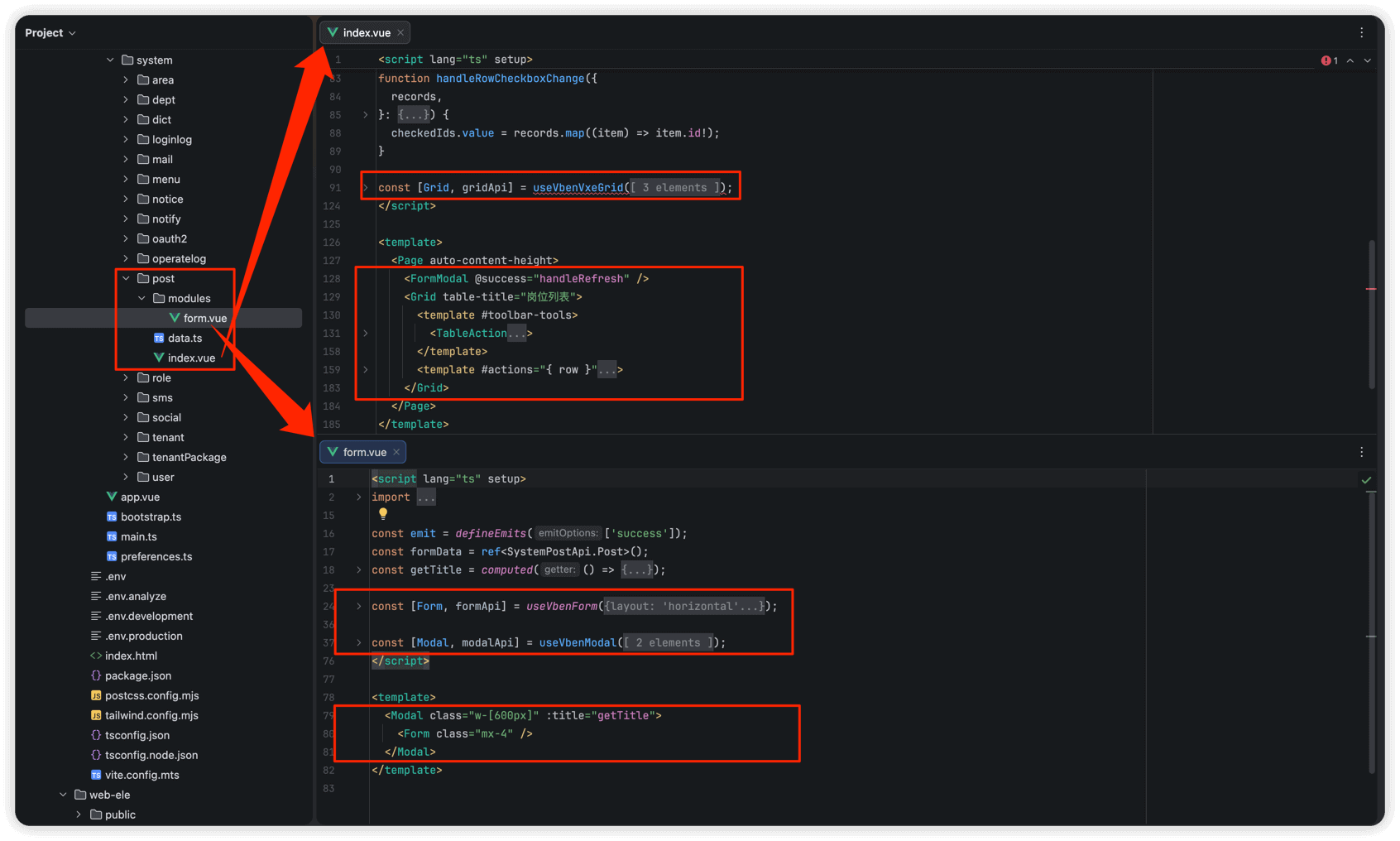
一般来说,一个路由对应一个 index.vue 文件,表单弹窗等组件放在 modules 子目录下。
2. api 请求
在 apps/web-antd/src/api 目录下,每个模块对应一个目录,包含该模块的所有 API 文件。
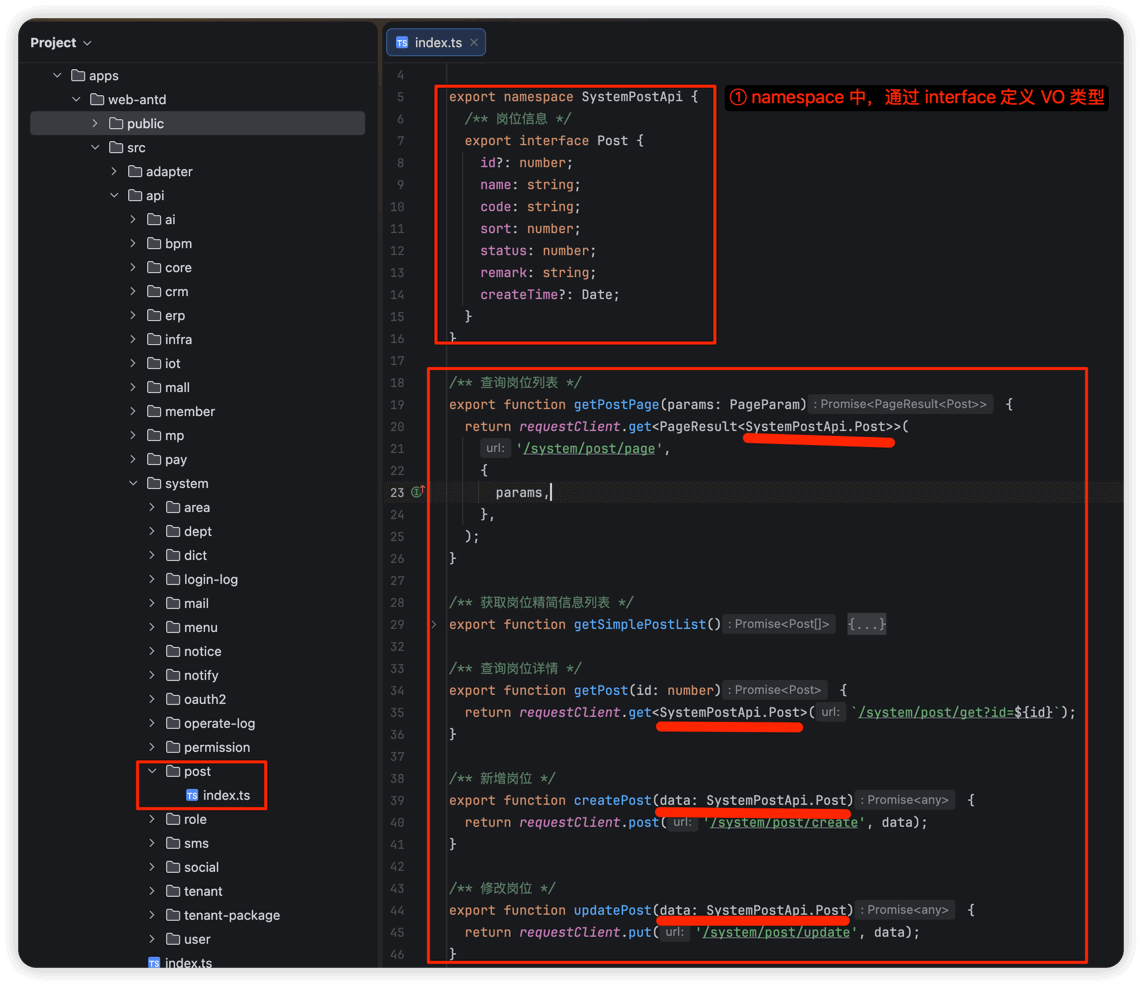
每个 API 文件通常包含:
- API 方法:调用
requestClient发起对后端 RESTful API 的请求 interface类型:定义 API 的请求参数和返回结果的类型,对应后端的 VO 类型
2.1 请求封装
项目使用 @vben/request 包进行请求封装,配置文件位于 apps/web-antd/src/api/request.ts 。
官方文档
详细的请求配置和使用方式,请参考:服务端交互与数据 Mock
请求封装中包含了以下核心功能:
- 租户支持:自动在请求头中添加
tenant-id租户编号 - 访问令牌:自动在请求头中添加
AuthorizationBearer Token - 刷新令牌:当访问令牌过期时,自动使用
refreshToken刷新令牌 - API 加密:支持请求数据加密和响应数据解密
- 错误处理:统一的错误消息提示和 401 未登录处理
3. component 组件
3.1 全局组件
① Vben Admin 5.x 提供了丰富的通用组件,位于 packages/effects/common-ui 目录下,常用组件包括 VbenVxeTable(表格)、VbenForm(表单)、VbenModal(弹窗)等等。
② 每个 UI 库(antd、ele、naive)也有自己的全局组件,放在各自应用的 src/components 目录下,例如:
- antd 版本:apps/web-antd/src/components
- ele 版本:apps/web-ele/src/components 这些组件包括:字典标签(dict-tag)、文件上传(upload)、富文本编辑器(tinymce)、图片裁剪(cropper)等,可供整个应用使用。
更多说明,可见 系统组件 文档。
3.2 模块级组件
每个模块可以有自己的 components 目录,用于存放可被该模块下多个页面复用的组件。例如: | 组件目录 | antd 版本 | ele 版本 | | 部门组件 | apps/web-antd/src/views/system/dept/components | apps/web-ele/src/views/system/dept/components | | 用户组件 | apps/web-antd/src/views/system/user/components | apps/web-ele/src/views/system/user/components |
3.3 页面内组件
每个页面的私有组件,放在 views 目录下对应页面的 modules 目录下,仅供当前页面使用,不对外暴露。 | 组件示例 | antd 版本 | ele 版本 | | 岗位表单 | apps/web-antd/src/views/system/post/modules/form.vue | apps/web-ele/src/views/system/post/modules/form.vue | | 日志详情 | apps/web-antd/src/views/infra/apiAccessLog/modules/detail.vue | apps/web-ele/src/views/infra/apiAccessLog/modules/detail.vue |
4. style 样式
项目使用 Tailwind CSS 作为主要的样式方案,可参考如下文档: